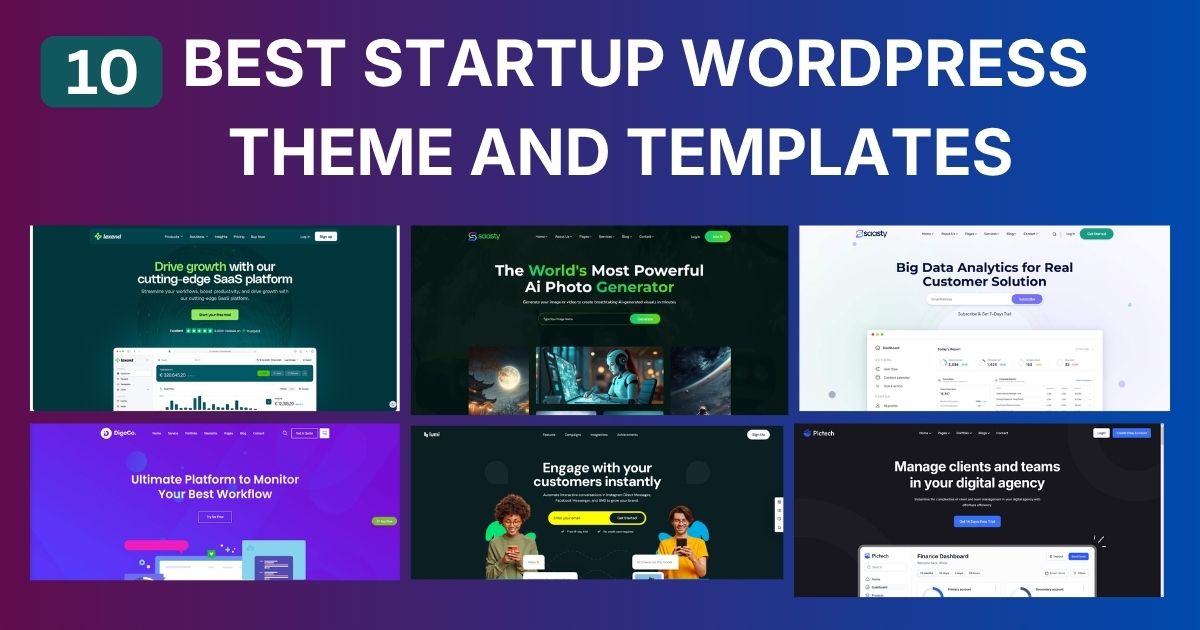
Good startup website design is less about trends and more about answering a visitor’s questions in the right order: what is this, is it for me, can I trust it, and what do I do next. This guide gives you a practical plan: the pages to build at each stage, a step-by-step design process, how to choose between a template, a freelancer and an agency, and the design principles that matter most for young companies.
| Stage | Pages | Goal |
|---|---|---|
| Pre-launch | Single landing page with waitlist | Learn who is interested |
| MVP | Home, features, pricing or access, about, contact | Win first users |
| Early revenue | Add case studies, integrations, changelog, blog | Build trust and search traffic |
| Fundraising | Strong about/team page, press page | Help investors check you |
| Growth | Campaign landing pages, careers, docs | Convert paid traffic and hire |
Draft the home page text first: headline, supporting line, three benefits, proof and call to action. Design built around real words looks and converts better than design filled with placeholder text.
Map sections in order of visitor questions. Low-fidelity wireframes on paper or in Figma are enough; the goal is order and hierarchy, not style.
Choose one or two fonts, a neutral base with one accent colour, a spacing scale and a button style. A small, consistent system looks more professional than many effects.
Most early traffic from social posts and communities is on phones. Make sure the headline and button appear on the first screen of a phone.
Start from a template or component library close to your structure rather than designing every element from scratch. Customise typography, colour and imagery to make it yours.
Show the page to five people in your audience and ask them to explain what you do and what they would click. Fix whatever confuses them before launch.
| Option | Best when | Watch out for |
|---|---|---|
| Template | Budget is tight and the message is still changing | Generic look if demo content is not replaced |
| Freelancer | You need custom design with a small budget and clear scope | Availability and long-term maintenance |
| Agency | You need strategy, branding and development together | Higher cost and longer timelines |


If you start from a template, OrdainIT’s Saasty (HTML, $9) and Saasty Next.js ($9) cover SaaS and software startups, and Sassty ($13, WordPress) suits teams that want to edit pages without code. Prices were checked on our site on 15 November 2026 and include lifetime updates; we check speed and demos before release. Our startup website template guide compares free options too.
A startup does not need a full brand book on day one, but a few decisions keep the site consistent. Pick a logo that works small, as a favicon and in a mobile header. Choose a primary colour with enough contrast for buttons and links, and one neutral palette for backgrounds and text. Select a font family with several weights so headings and body text match. Write three or four words that describe your tone, such as direct, friendly and expert, and use them to review copy. Save these choices in a short style page so anyone editing the site later follows them.
The home page carries most of the load, so give it a clear order. Start with the headline, supporting line and main button. Follow with a product visual and proof such as early users or founder credentials. Then explain three to five benefits, each with a short heading and one or two sentences. Add a how-it-works section in three steps, a short FAQ for common objections, and finish with the main button again. Keep secondary links in the footer so the main path stays clear.
Search traffic grows slowly, so start early with the basics. Give each page a clear purpose and a matching title and description. Publish useful articles about the problems your customers search for, not just company news. Add structured data for your organisation, submit a sitemap to Google Search Console and Bing Webmaster Tools, and earn links by sharing genuinely useful resources. A clean, fast design makes all of this easier.
Startup website design is never finished. Review the site every month in the early stages: read support emails and sales calls for questions the site should answer, check which pages visitors leave from, and update the copy. As the product changes, retire old screenshots quickly; outdated visuals make a young company look abandoned. Keep a simple changelog of site updates so the team knows what changed and why.
When the company grows and the message settles, a fuller redesign can bring custom illustrations, a design system shared with the product, and richer case studies. Until then, clarity, honest proof and speed will do more for your startup website design than any visual trend.
Before launch, check every page on a phone, test every form and link, confirm the privacy policy and contact details are visible, and run PageSpeed Insights on the home page. Fix anything that blocks a visitor from the main action first.
Most of these steps take an afternoon, and they prevent the most common launch problems.
A clear explanation of the product, an obvious audience, honest proof and one main action, delivered quickly on mobile.
At launch, often five: home, product or features, pricing or request access, about, and contact with legal pages.
Most early startups should use a template and spend the saved time on copy and product. Custom design makes more sense once the message and audience are proven.
Update content continuously and redesign when the product, audience or positioning changes significantly, not on a fixed schedule.
Common choices are Figma for design, and WordPress, Webflow, Framer or Next.js for building, depending on who will maintain the site.
Chosen a theme or template? The OrdainIT team, which designs and builds its own WordPress themes and templates, can also get your website live. Pick a fixed-price service:
Want a design to start from? Browse OrdainIT WordPress themes, each with free installation and lifetime updates, or see all WordPress services. Not sure what you need? Contact OrdainIT for a free, no-obligation quote.
See OrdainIT’s themes and customer ratings on OrdainIT’s ThemeForest profile.




 New release: