Wix vs WordPress is a choice between convenience and control. Wix is an all-in-one, hosted website builder: you pay a monthly plan and Wix handles hosting, security and updates while you design with drag and drop. WordPress is free, open-source software you install on hosting you choose, giving you full ownership, unlimited design options through themes and plugins, and stronger tools for content and SEO, in exchange for handling maintenance yourself or paying someone to.
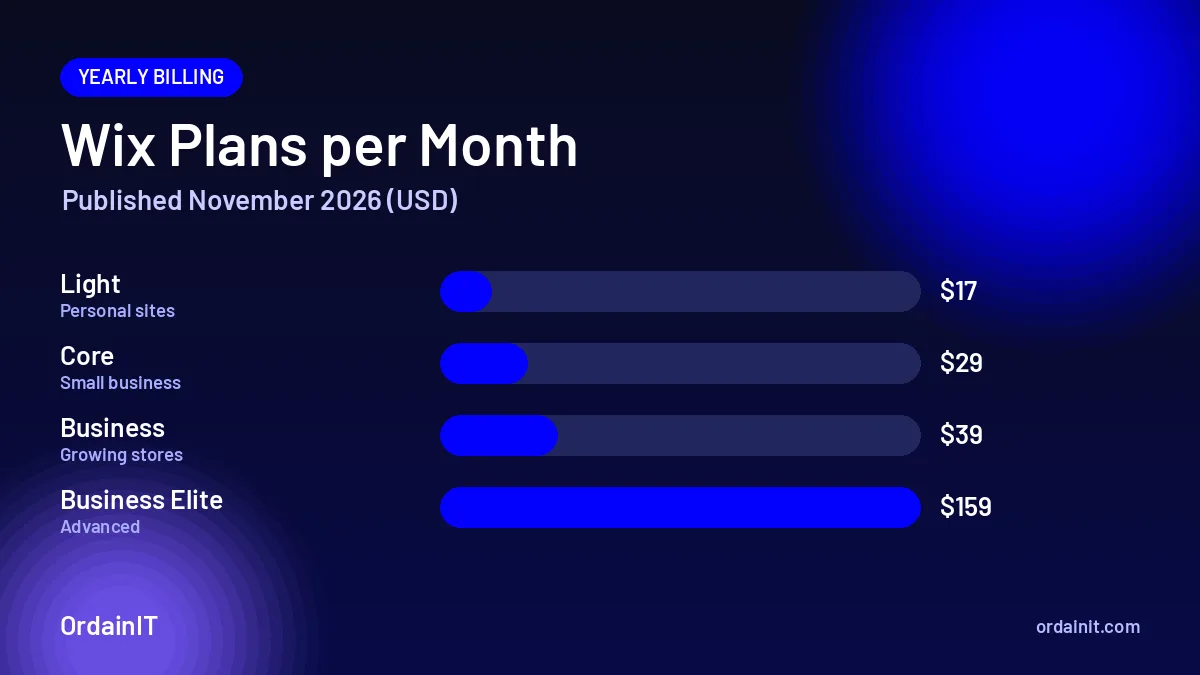
Key takeaways: Wix’s paid plans cost $17 (Light), $29 (Core), $39 (Business) and $159 (Business Elite) per month on yearly billing, according to Wix’s own pricing guide (November 2026). A small WordPress site usually costs less per year, but you take on updates and backups.
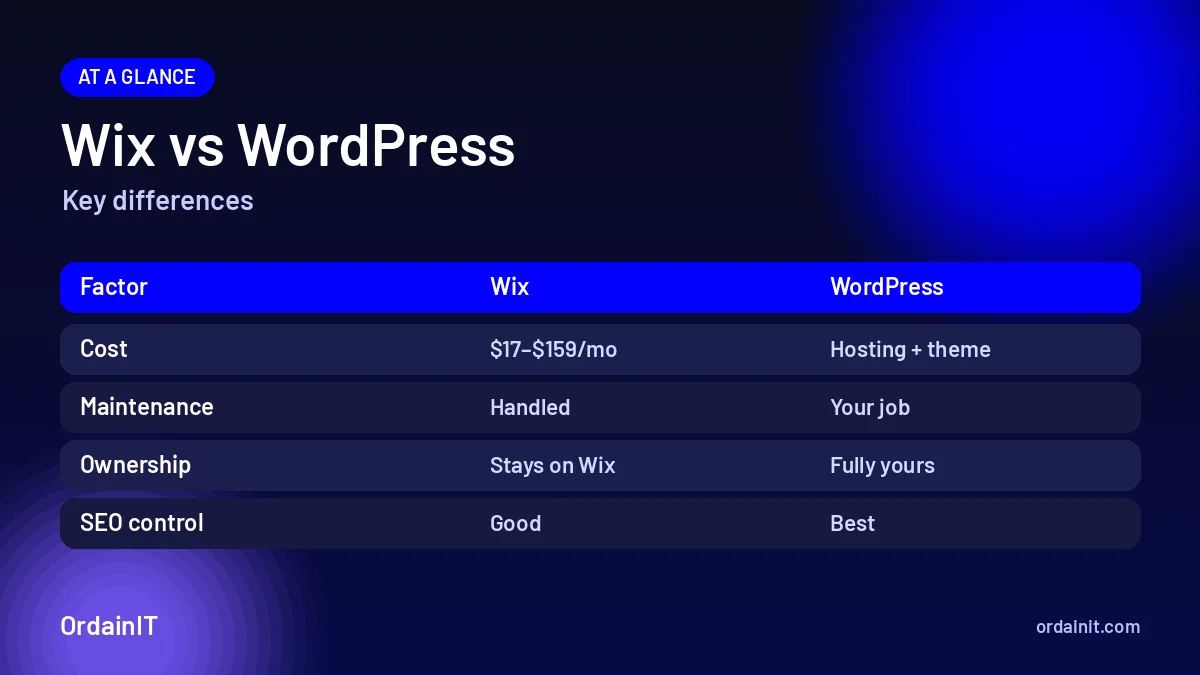
| Factor | Wix | WordPress |
|---|---|---|
| Type | Hosted website builder | Self-hosted open-source CMS |
| Cost | $17–$159/month (yearly billing) | Software free; pay hosting, domain, theme |
| Ease of use | Very easy, drag and drop | Easy with page builders; small learning curve |
| Design freedom | High within the Wix editor | Practically unlimited |
| Maintenance | Handled by Wix | Your responsibility |
| Ownership and portability | Site stays on Wix | You own files; move hosts any time |
| Blogging and SEO | Good built-in tools | Best-in-class plugins and control |
Wix is a cloud-based website builder. You choose a template, edit it visually, and publish without touching code or servers. Hosting, SSL, security and software updates are included in the plan. Extra features come from the Wix App Market. Wix also offers a free plan, but it shows Wix branding and does not allow a custom domain, so most businesses use a paid plan.
WordPress is open-source software that you install on your own hosting. You choose a theme for the design and add plugins for features such as forms, SEO, online stores (WooCommerce), bookings and memberships. Because you control the files and database, you can customise anything and move your site to another host whenever you like. If you are new to it, start with our guide on how to install a WordPress theme.
On Wix, the cost is mainly the plan: from $17 a month for Light up to $159 for Business Elite on yearly billing, with higher prices for monthly billing, plus any paid apps. On WordPress, you pay for hosting (often a few dollars to around $30 a month for a small site), a domain (roughly $12–$25 a year), a theme and any premium plugins. A premium OrdainIT theme is $13. Over three years, WordPress is usually cheaper for a small business site, but count the time or money spent on updates honestly. Our website design cost guide breaks down every line item.
Wix wins for absolute beginners: everything happens in one editor, and there are no updates to run. WordPress has more moving parts, but a modern theme with a page builder such as Elementor makes editing visual too; see our guide to Elementor templates. Once set up, many owners find WordPress just as easy for day-to-day changes.
Both platforms cover SEO basics: editable titles and descriptions, clean URLs, sitemaps and mobile-friendly layouts. WordPress gives more control through plugins such as Rank Math or Yoast, flexible schema markup, advanced redirects and superior blogging. If content marketing is central to your plan, WordPress has the edge. Theme quality matters too; read our guide to an SEO friendly WordPress theme.
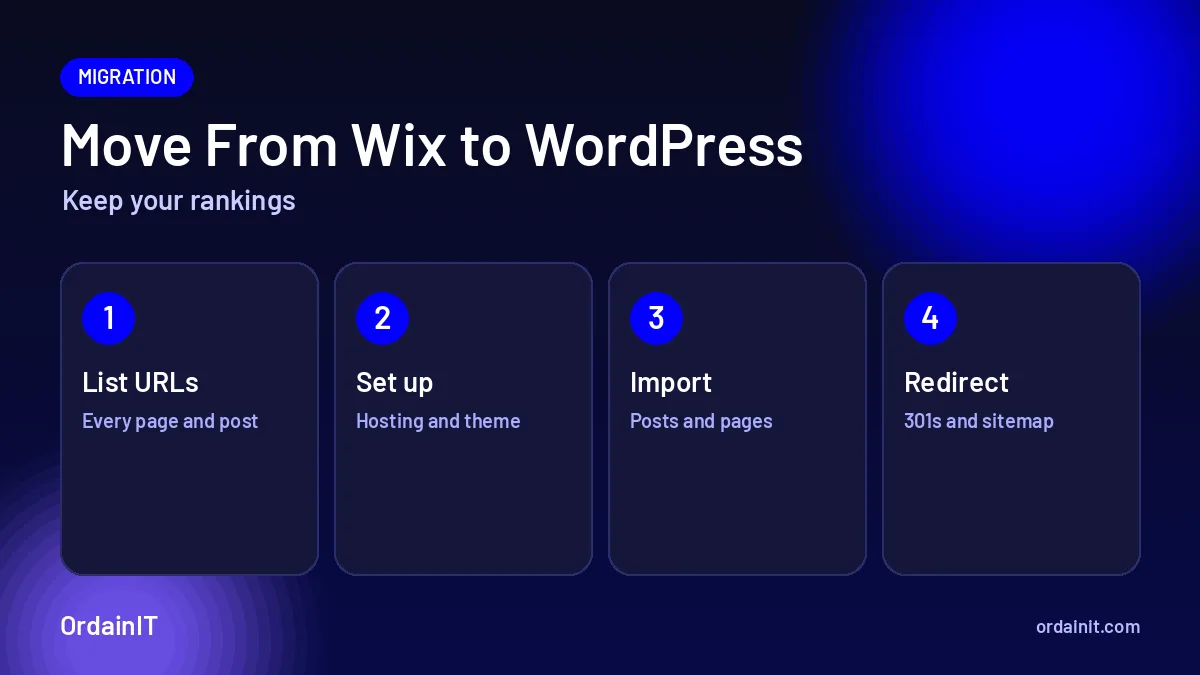
With Wix, your site design lives on Wix’s platform. You can export some content, such as blog posts, but you cannot move the full site to another host. With WordPress, you own every file and can migrate to new hosting, hire any developer and keep full backups. For businesses planning to grow for years, this independence is often the deciding factor.
Wix takes care of security patches, server updates and uptime. WordPress puts that responsibility on you: update the core, theme and plugins, take backups and use good hosting. A simple routine, such as our website maintenance checklist, keeps it manageable, and the 12-month WordPress care plan ($99) can handle it for you.
| Business | Better fit | Why |
|---|---|---|
| Personal portfolio | Either | Wix for speed of setup; WordPress for lower long-term cost |
| Local service business | WordPress | Niche themes, service pages and local SEO control |
| Content or blog site | WordPress | Best publishing and SEO tools |
| Event or one-off campaign | Wix | Quick launch, no maintenance for a short-lived site |
| Agency building client sites | WordPress | Reusable themes, client ownership, no per-site platform fee |
The Wix vs WordPress decision often comes down to who maintains the site and how long you plan to keep it. A short-lived or very simple site suits Wix; a long-term business asset usually suits WordPress.
Our website migration and safe launch service ($99) can handle the move and redirects for you.
A practical way to decide is to build the same three pages, home, services and contact, on a Wix free trial and on a WordPress test site with a ready theme. Note how long each takes, how the pages look on your phone and how easy it is to change text a week later. That hands-on comparison usually settles the question faster than any feature list.
Wix is easier for beginners; WordPress offers more control, ownership and SEO power. The better choice depends on your goals and skills.
Usually, for small sites. WordPress has no platform fee, while Wix paid plans start at $17 a month on yearly billing.
Both handle the basics. WordPress gives finer control and better blogging, which helps content-driven SEO.
Yes, but the design must be rebuilt in a WordPress theme. Blog posts can be imported, and redirects protect your rankings.
No. Themes, page builders and plugins let you build and manage a site without code.
Chosen a theme or template? The OrdainIT team, which designs and builds its own WordPress themes and templates, can also get your website live. Pick a fixed-price service:
Want a design to start from? Browse OrdainIT WordPress themes, each with free installation and lifetime updates, or see all WordPress services. Not sure what you need? Contact OrdainIT for a free, no-obligation quote.
See OrdainIT’s themes and customer ratings on OrdainIT’s ThemeForest profile.



We reply 24 hours a day, Monday to Saturday. Sunday is our day off.