A yoga website template gives studios, teachers and retreat organisers ready pages for class schedules, instructors, pricing, booking and contact. When we checked ThemeForest’s yoga template results on 15 November 2026, most popular listings had not been updated for years, so this guide separates current options from outdated ones, explains which format suits a studio, and shows how to add real class booking.
We read ThemeForest’s search results for yoga templates on 15 November 2026 for price, sales, reviews and last update, and WordPress.org data for booking plugins the same day. We earn nothing from these links. Test the demo and run a speed test yourself.
ThemeForest search results, WordPress.org and our product page, 15 November 2026.
| Option | Format | Price | Sales | Last update | Note |
|---|---|---|---|---|---|
| Fityoga (OrdainIT) | Figma | $9 | Own store | Lifetime updates | 30+ pages incl. schedule and booking |
| YOGAGURU | Template | $29 | 21 | 8 Feb 2026 | Recently updated |
| Yogasan | HTML | $49 | 2 | 13 Jun 2025 | Little history |
| Yoge | HTML | $25 | 69 | 27 Nov 2023 | Older |
| Asana | HTML | $17 | 475 / 13 | 18 Jan 2017 | Best seller, old code |
| Amelia (booking) | WordPress plugin | Free + add-ons | 90,000+ installs | 27 Oct 2026 | 92/100 |
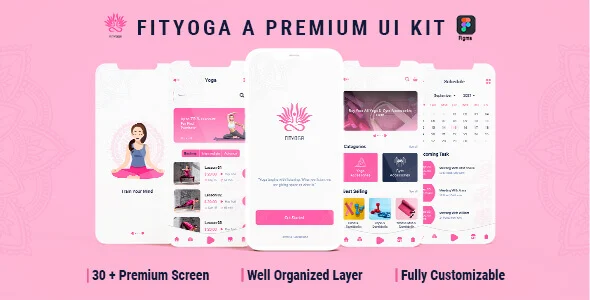
Our yoga website design in Figma has 30+ pages, including a class schedule, instructor profiles, a blog and a booking page, for $9 on our site on 15 November 2026 with free lifetime updates. It suits studios working with a developer or builder. View Fityoga.
$29, 21 sales, last updated 8 February 2026. A recently updated health, beauty and yoga template. View YOGAGURU.
$49, 2 sales, last updated 13 June 2025. An HTML yoga template with little sales history yet. View Yogasan.
Asana ($17, 475 sales, 13 reviews) was last updated 18 January 2017, Yogi ($17, 200 sales) on 27 July 2015, and Yoge ($25, 69 sales) on 27 November 2023. Asana is the best seller but its code is years old, so plan for updates if you use it.
A template provides the design; booking needs a system behind it. Many studios already use a booking platform that offers an embeddable schedule widget. On WordPress, plugins such as Amelia (version 2.4.14, 90,000+ active installs, 92/100, updated 27 October 2026) and Bookly (version 28.8, 60,000+ installs, 88/100, updated 12 November 2026) add appointments and classes, with paid add-ons for some features. Check that your choice handles class capacity, passes and waitlists before building around it.
The schedule is the most visited page on most studio sites. Show the week at a glance on desktop and a simple day-by-day list on phones. Include class name, level, teacher, length and whether it is in person or online, and let visitors filter by level or style. Make the book button sit next to each class. Most importantly, keep it accurate: cancelled or changed classes should update immediately, ideally from the same booking system students use, so the website never shows something different from the booking page.
New students are often nervous. A dedicated page answering their questions lowers that barrier: which class to start with, what to wear and bring, whether mats are provided, when to arrive, how to tell the teacher about injuries, and what the intro offer includes. Add photos of the actual studio and teachers rather than stock images, so visitors know what to expect when they walk in. Link this page from the home page and the schedule.
Most people search for yoga classes near them. Keep your studio name, address and phone identical on the website and your Google Business Profile, add your neighbourhood and town to the home page and contact page, and create pages for distinct offerings such as prenatal yoga or beginners’ courses. Encourage happy students to leave reviews, and respond to them politely. Post workshops and events with dates so they can appear in local results.
When comparing a yoga website template, look at the pages that drive bookings rather than the hero photo. Check that the demo includes a schedule layout, teacher profiles, pricing with passes and memberships, and an events or workshop page. Open each on a phone, since most students book on mobile. Confirm the last update date and read recent buyer comments. If a template lacks a schedule or pricing layout, you will spend more time building those than you save on design.
Yoga sites rely on calm, spacious design and large photography, which can slow pages if images are not prepared. Resize and compress photos, use WebP, avoid autoplay background video on phones, and load booking widgets only on the pages that need them. A light, fast site also feels more in keeping with the calm experience studios want to communicate.
Many studios now offer online or hybrid classes. If you do, mark online classes clearly in the schedule, explain which video platform you use, and send links automatically after booking rather than publishing them on the site. A members area or on-demand library usually needs a membership plugin or platform; plan for it before choosing a yoga website template, since retrofitting members features into a template without them takes extra work.
We recheck the listings and plugin data in this guide regularly and update the date when they change.
Workshops, retreats and teacher trainings often bring in more revenue than regular classes, and they need more information. Give each one its own page with dates, location, schedule, what is included, price, payment plans, cancellation policy, teacher biographies and an application or booking form. Add a short FAQ and a few photos from previous events if you have them. Publish these pages well in advance, because people plan retreats and trainings months ahead, and keep them updated with remaining places so visitors know when to act.
A well-chosen yoga website template gives you the layout; the schedule, teachers, photos and honest information are what turn visitors into regular students. Launch with the essentials, keep the schedule accurate, and improve one page at a time based on what students ask you most often.
Before you choose, decide how students will book: a booking plugin, a studio software embed or simple enquiries. Test that option with the class schedule page in the demo so timetables and bookings work together from day one.
A class schedule, booking, teacher profiles, pricing, new student information, location and contact.
Only with a booking system connected, such as a WordPress booking plugin or your studio software’s widget.
They can be, but code not updated for years may need fixing. Prefer recently updated options.
Yes. It handles schedules, blogs and booking through plugins and lets staff update content without a developer.
Make the intro offer and booking button obvious, keep the schedule current, and build local search visibility.
Chosen a theme or template? The OrdainIT team, which designs and builds its own WordPress themes and templates, can also get your website live. Pick a fixed-price service:
Want a design to start from? Browse OrdainIT HTML templates, with lifetime updates, or see all WordPress services. Not sure what you need? Contact OrdainIT for a free, no-obligation quote.
See OrdainIT’s themes and customer ratings on OrdainIT’s ThemeForest profile.



We reply 24 hours a day, Monday to Saturday. Sunday is our day off.