A healthcare website redesign is worth doing when the current site makes it hard for patients to book, find information or use the site with a disability, or when it can no longer be updated safely. Done well, it improves patient experience and search visibility; done carelessly, it can lose rankings and break booking flows. This guide covers the signs you need a redesign, the accessibility rules that now apply in the United States, a step-by-step process, and a migration checklist that protects your search traffic.
In the United States, the Department of Health and Human Services adopted WCAG 2.1 Level AA as the technical standard for web content and mobile apps under Section 504 in a rule published on 9 May 2024. An interim final rule in 2026 extended the compliance dates: to 11 May 2027 for recipients of HHS federal financial assistance with 15 or more employees, and to 10 May 2028 for those with fewer than 15. The standard itself did not change. If your organisation receives HHS funding, plan the redesign to meet WCAG 2.1 AA; elsewhere, check your local rules, since many countries reference the same guidelines. This is general information, not legal advice. Federal Register notice.
List every page, its traffic and which pages bring appointment requests. Run an accessibility check and a speed test, and collect common patient questions from reception staff.
Pick measurable goals, such as more online appointment requests or fewer phone calls about opening hours. List audiences: new patients, existing patients, referrers and job candidates.
Group services by how patients search, give each doctor and location its own page, and keep booking one click away on every page.
Write key pages before final design. Have clinicians review medical content, and add review dates.
Use semantic headings, labelled form fields, sufficient contrast and keyboard-friendly menus. Retrofitting accessibility later costs more.
Follow the checklist below, test with real staff and patients, then launch at a quiet time and monitor.
| Step | What done looks like |
|---|---|
| Inventory every URL | Spreadsheet of all pages and their traffic |
| Map old to new URLs | Every old page gets a matching new page |
| Set 301 redirects | No old URL returns a 404 |
| Keep valuable content | Do not delete pages that bring patients |
| Carry over titles and descriptions | Then improve them |
| Update internal links | Point straight to new URLs |
| Submit new sitemap | In Google Search Console and Bing Webmaster Tools |
| Test forms and booking | From a phone, end to end |
| Monitor for 4 to 8 weeks | 404 errors, traffic and enquiries |
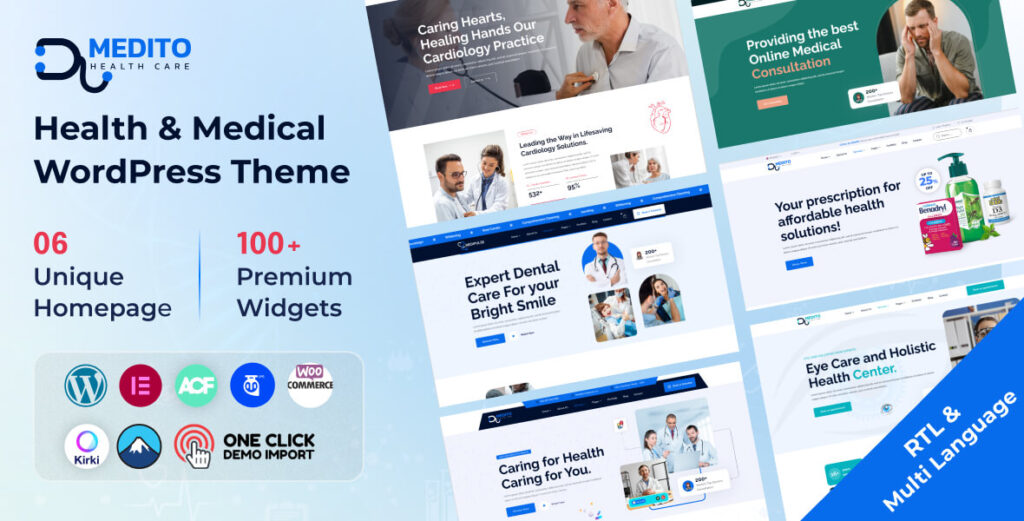

Small and mid-size practices can save time and budget by starting from a maintained template and customising it. OrdainIT’s Medito WordPress theme ($13, with free installation) covers hospitals, clinics, doctors and dentists, and Medinosi ($9) is an HTML option; prices from our site on 15 November 2026, with lifetime updates. We check speed and demos before release, but you should still test accessibility and speed on your own content. Large hospital systems with portals and integrations usually need a custom project. Our healthcare website template guide compares more options.
A healthcare website redesign usually delivers its value in a few practical areas. Patients find services, doctors and booking faster, which reduces calls to reception. Accessible design opens the site to patients with disabilities and lowers legal risk. A modern platform with regular updates reduces security exposure. Clearer service pages and faster loading help search visibility. Staff who can edit content themselves keep information accurate. Measure each goal before and after launch, so you can show what actually improved rather than relying on general claims.
Involve the people who answer patient questions every day. Receptionists know which information patients cannot find; clinicians must approve medical content; compliance staff should review privacy and accessibility; and IT or your web partner handles hosting, redirects and integrations. Agree one decision-maker for design and content so the project does not stall in approvals.
Automated checkers find many issues but not all. After building, test with a keyboard only, with a screen reader on at least one key journey such as booking an appointment, and with browser zoom at 200 percent. Check captions on videos and alternatives for PDFs, which were a particular concern in the federal rulemaking record. Fix the most serious barriers before launch and keep a plan for the rest.
The launch is the start of a new routine, not the end of the project. In the first weeks, watch for 404 errors, broken forms and drops in search traffic, and fix them quickly. Ask reception staff whether patient calls about basic information have changed. Review accessibility each time new content or a new tool is added, because one inaccessible PDF or widget can undo good work. Schedule quarterly content reviews for doctors, services and opening hours. Treat the healthcare website redesign as the foundation for continuous small improvements, rather than waiting years for the next big project.
The regulatory dates in this guide were checked against the Federal Register notice on 15 November 2026; we will update them if they change again.
Agree on the numbers you will compare before launch, such as online appointment requests per week, calls about opening hours, mobile page speed and accessibility errors. Record them now, then check again one and three months after launch so the results of the work are clear to everyone involved in the project from the start.
When it stops meeting patient needs, accessibility standards or security requirements, not on a fixed schedule. Content should be updated continuously.
It can if URLs change without redirects or content is removed. A careful migration with 301 redirects and preserved content protects rankings.
WCAG 2.1 Level AA is the US standard for HHS-funded providers under Section 504; many organisations aim for WCAG 2.2 AA.
After the 2026 extension, 11 May 2027 for recipients with 15 or more employees and 10 May 2028 for smaller recipients.
It depends on size, approvals and integrations. A small practice using a template can move quickly; a hospital with many departments and systems needs a longer project.
Chosen a theme or template? The OrdainIT team, which designs and builds its own WordPress themes and templates, can also get your website live. Pick a fixed-price service:
Want a design to start from? Browse OrdainIT WordPress themes, each with free installation and lifetime updates, or see all WordPress services. Not sure what you need? Contact OrdainIT for a free, no-obligation quote.
See OrdainIT’s themes and customer ratings on OrdainIT’s ThemeForest profile.





 New release: