Free HTML templates are ready-made website designs built with HTML, CSS and usually a little JavaScript that you can download, edit and publish without paying. The best ones are responsive, use clean code and come with a clear licence. Before using any free template, check three things: whether commercial use is allowed, whether you must keep a credit link, and when it was last updated.
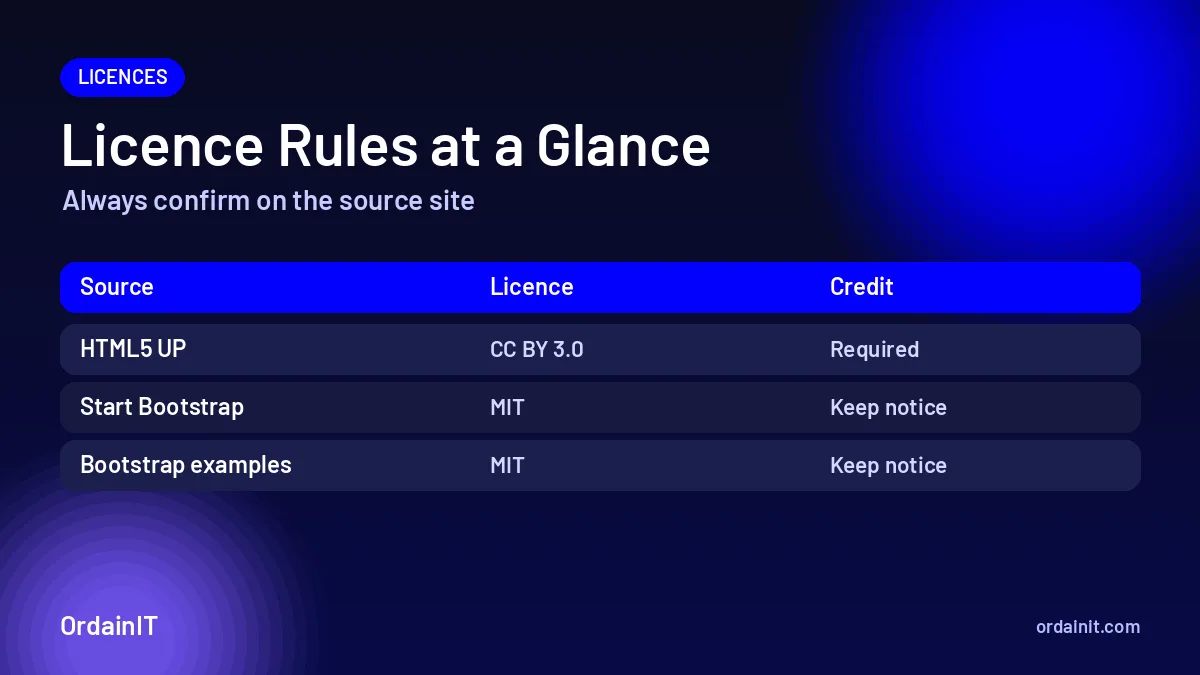
Key takeaways: free templates are excellent for portfolios, landing pages, small business sites and learning. Licences vary: HTML5 UP templates use Creative Commons Attribution 3.0 and need a credit, while Start Bootstrap’s free templates use the MIT licence.
A free HTML template is a folder of static files, normally an index.html page, a few inner pages, CSS stylesheets, JavaScript files, fonts and images. You open the files in a code editor, replace the text and pictures with your own, and upload the folder to any web host. There is no database and no CMS, which makes HTML sites fast, cheap to host and hard to hack. If you are not sure whether HTML or a CMS suits you, read our comparison of WordPress vs HTML.
We publish several free HTML templates alongside our premium collection. Each is responsive and free to download:
Browse the full set in our free products section.
| Source | Licence | Credit needed? |
|---|---|---|
| HTML5 UP | Creative Commons Attribution 3.0 | Yes, credit HTML5 UP |
| Start Bootstrap | MIT | Keep the licence notice in the code |
| Bootstrap examples | MIT | Keep the licence notice in the code |
| OrdainIT free templates | See each product page | See each product page |
Licence terms can change, so always read the licence on the source’s own site before you publish. For third-party templates, open the live demo and run a speed test yourself before you download.
Thousands of people may download the same design, so a few changes go a long way toward making it feel like your own brand:
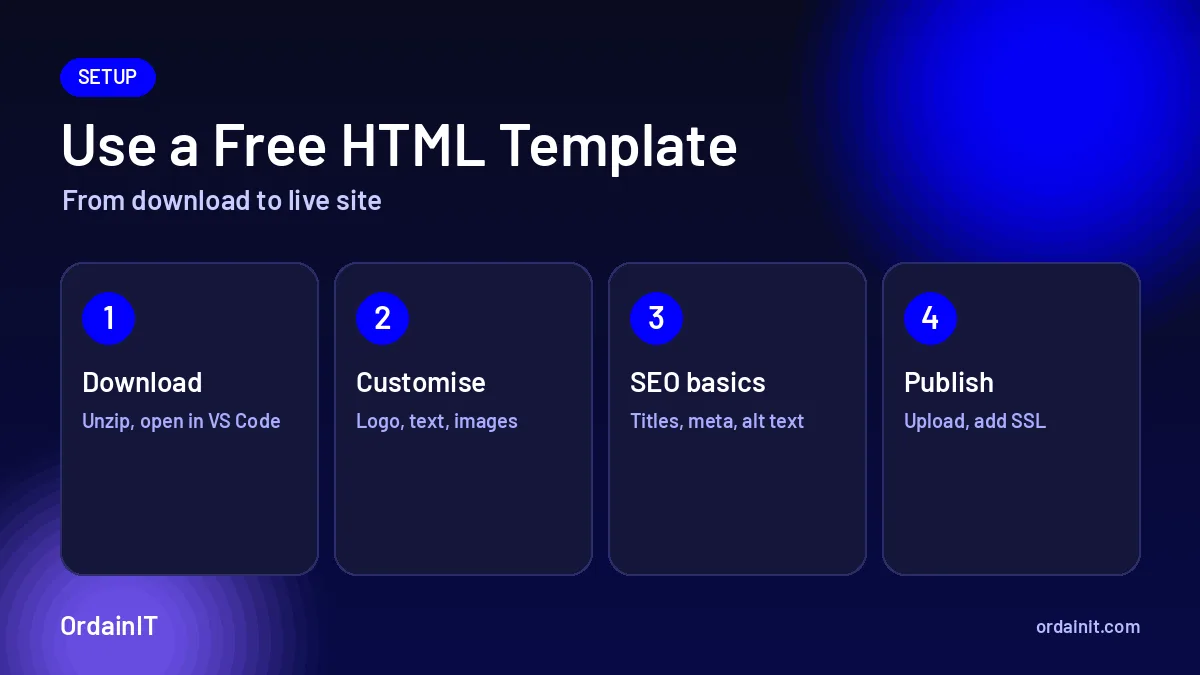
Spend ten minutes on a final technical check. Search the files for links you do not recognise, especially in the footer and in JavaScript files. Remove unused libraries, sliders and icon packs that add weight without adding value. Make sure each page has a unique title, one H1 and a meta description, and that images have alt text and width and height attributes. Finally, run the finished site through the W3C Markup Validator and PageSpeed Insights once more. A tidy, fast static site built from free HTML templates can compete well in search results, because speed and clean structure are exactly what search engines and visitors reward.
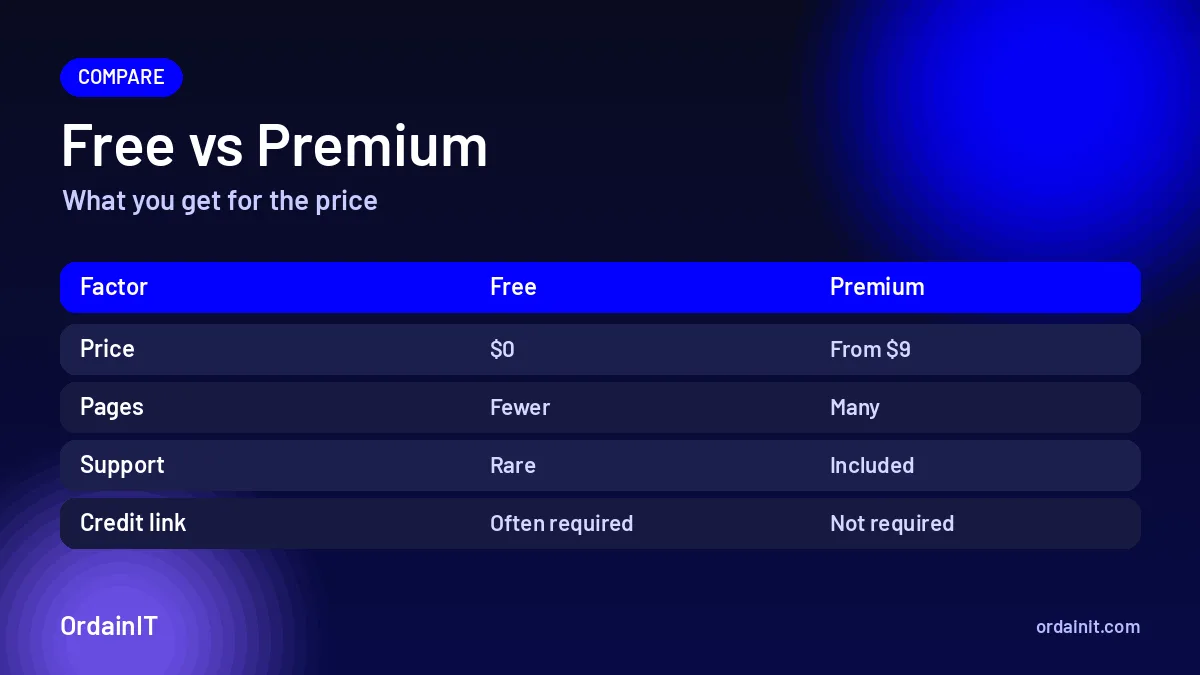
| Factor | Free templates | Premium templates |
|---|---|---|
| Price | $0 | Most OrdainIT HTML templates are $9 |
| Pages and sections | Fewer pages | Many inner pages and variations |
| Support | Usually none | Developer support and documentation |
| Updates | Irregular | Regular updates |
| Credit link | Often required | Not required |
If you need many sites, the OrdainIT HTML template bundle includes 25 templates for unlimited client sites.
Static HTML sites are cheap and simple to host because there is no database or server-side code. Common options include:
Whichever you choose, connect your own domain, switch on HTTPS and set up a simple backup of the files so you can restore the site quickly.
A free template suits students learning web design, freelancers building a first portfolio, small businesses that need a simple brochure site, event and product landing pages, and developers who want a quick starting point for a prototype. If you need a blog, frequent content updates or an online shop, a CMS such as WordPress is usually a better fit; see our guide on what a website template is for the main types.
Yes, when downloaded from the original creator. Avoid re-upload sites, and scan the code for unknown links or scripts before publishing.
Often yes, but it depends on the licence. MIT and Creative Commons Attribution allow commercial use; Attribution requires a visible credit.
Basic HTML and CSS knowledge helps. Changing text and images is simple, but layout changes need some coding comfort.
Any web host works because the files are static. Shared hosting, static hosting services and CDNs can all serve HTML sites.
They can be, because static pages load fast. Add your own titles, meta descriptions, headings, alt text and useful content.
Chosen a theme or template? The OrdainIT team, which designs and builds its own WordPress themes and templates, can also get your website live. Pick a fixed-price service:
Want a design to start from? Browse OrdainIT WordPress themes, each with free installation and lifetime updates, or see all WordPress services. Not sure what you need? Contact OrdainIT for a free, no-obligation quote.
See OrdainIT’s themes and customer ratings on OrdainIT’s ThemeForest profile.



We reply 24 hours a day, Monday to Saturday. Sunday is our day off.