 New release:

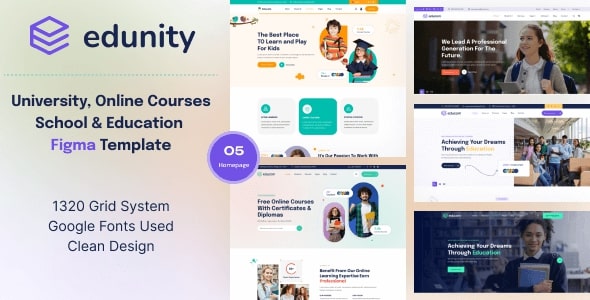
Edunity – The Best Education Figma Template
Edunity is an education Figma template for schools, universities, online learning platforms and tutoring services. It comes with 33+ layered Figma files and 5 homepage layouts, built on the Bootstrap 5 grid system. See the live preview of Edunity.
The design includes course catalogs and course details, teacher and student profiles, event pages, blog and news sections, contact and registration forms, and a dark mode design.
Quick Facts
- Format: Figma file (open it in Figma)
- Included: 33+ layered Figma files and 5 homepage layouts
- Updates: free lifetime updates
- Seller: OrdainIT, on ThemeForest since 2021
Who Is Edunity For?
- Schools and universities, with sections for departments, admissions and alumni
- E-learning platforms
- Tutors and coaching centers
- Education startups
What Is Included in Edunity?
- 33+ layered Figma files
- 5 homepage layouts
- Important details pages and inner pages
- Course catalogs and course details
- Teacher and student profiles
- Event management pages
- Blog and news sections
- Contact and registration forms
- Dark mode design
- Active and hover styles included
- Every page fully layered and named
- Pixel perfect, clean and modern style
- Bootstrap 5 grid system
- Google free fonts
Fonts, Icons and Image Credits
- Fonts: Google Fonts
Tips for Customizing Edunity
A school or e-learning website should answer three questions fast: what can I learn, who teaches it and how do I sign up. Keep that in mind while you edit.
- Show your best courses on the homepage and link each one to its detail page.
- Introduce teachers with real photos and a short bio.
- Put the registration form one click away from every course page.
- Check the dark mode pages after you change the colors.
How to Use Edunity
- Get the template with the buy button on this page.
- Open the files in Figma and work on a copy, so the original stays untouched.
- Replace the sample text, images, logo and colors with your own content.
- Share the design with your developer or build it in your favorite tool.
About OrdainIT
OrdainIT has built website templates since 2021, with 1,300+ sales and a 4.48 out of 5 rating from 25 ratings on ThemeForest. Every template comes with free lifetime updates. See the OrdainIT portfolio on ThemeForest.
Frequently Asked Questions
What file format is Edunity?
Edunity is a Figma template. Open it in Figma to edit it.
Do I get free updates?
Yes. OrdainIT templates come with free lifetime updates.
Where can I read the reviews and the item details?
Edunity is listed on ThemeForest, where you can see the item details. Open the ThemeForest item page.
Is there a coded version?
OrdainIT also sells HTML templates and WordPress themes. Browse them if you want a ready-to-launch website instead of a design file.
Where can I read the license terms?
The license terms are explained on the OrdainIT license page.
More Templates and Guides
- Educate – Best Figma Template for Educational Website
- Browse all Figma and design templates from OrdainIT
- Browse all free templates from OrdainIT
- Read our guide: Education Website Templates for Schools, Universities & Online Courses
- Read our guide: 20+ Best Free Figma Website Templates for Your Projects

Reviews
There are no reviews yet.