New release: Solaar 2.0 is out now!
Introduction: Why Your Consulting Website Matters
In 2025, having a well-designed website is a must for business consultants. It’s not just a digital brochure; it’s your main marketing tool, your online reputation, and a direct way to connect with potential clients whether you’re an individual consultant or part of a consulting firm, a professional-looking website can make all the difference in attracting and converting leads.
That’s where the Elementor Business Consulting WordPress Theme comes in. It’s a highly customizable theme built specifically for consulting professionals who want an easy way to create a polished, functional website. Combined with Elementor’s drag-and-drop page builder, it’s an ideal tool for designing a site without any coding knowledge.
This guide will walk you through everything you need to know about using this theme in 2025—from why it’s a great choice to how to set it up, customize it, and make sure it performs at its best.
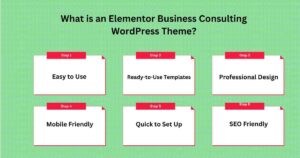
An Elementor Business Consulting WordPress Theme is a special type of website template. It is made for business consultants, consulting firms, or anyone who wants a professional business website. It works with the Elementor page builder, which makes it super easy to build and customize a website without needing to know how to code.
With these themes, you can very easily create a great-looking website in no time. You don’t have to start from scratch or hire a web development worker. Everything is already set up for you, and you just need to add your content and make it your own.
Why Use an Elementor Business Consulting Theme?
There are many reasons why these themes are a good choice. Let’s review those good points step by step.
1. Easy to Use
Elementor is a tool that makes building a website simple. You use a drag-and-drop system. This means you can click on an element, like text or a picture, and drag it to where you want it to go. You can also click to edit text, change colors, and update images.
2. Ready-to-Use Templates
The theme comes with pre-made pages and layouts. These usually include:
These templates save you time. Simply choose a template and design or modify each page to suit your needs.
3. Professional Design
These themes are crafted to appear sleek and contemporary, while also being incredibly user-friendly. This helps you build a trustworthy presence among potential clients. A well-designed website shows that your business is serious and trusted.
4. Mobile-Friendly
Many people browse websites on their phones or tablets. These themes are designed to be visually appealing and function seamlessly across all devices. Whether someone is using a computer, tablet, or phone, your website will look great and be easy to use.
5. Quick to Set Up
You can launch your website in a very short time or quickly. Since the templates are already designed, you just need to make small changes, like adding your text, logo, and photos. This can save you a lot of time compared to building a website from scratch.
6. SEO-Friendly
SEO stands for Search Engine Optimization. It boosts your website’s visibility on Google and other search engines. These themes are designed with SEO in mind, so it’s easier for people to find you online.
Here are some popular Elementor-compatible themes for business consulting:
1. Astra
2. Consulting WP
3.OceanWP
4.Sydney Pro
1. Choose a Theme
Select a theme that you love and that complements your business.
2. Install WordPress
Make sure you have WordPress installed on your website. Most hosting providers let you install WordPress easily.
4. Install Elementor
5. Import Templates
6. Customize Your Website
7. Publish Your Website
Once you’re happy with your design, click Publish to make your website live.
Creating a professional business consulting website with the Elementor Business Consulting WordPress Theme is a fantastic way to showcase your services, attract clients, and grow your business. However, establishing the theme is only the beginning. Now, it’s time to customize your site so it truly represents who you are and what you offer. This guide will walk you through the key elements of personalizing your consulting website in an easy-to-understand way.
Encourage visitors to take the next step. Use buttons like:
Highlight Your Benefits: List 2-3 ways you help clients. Bullet points make this easy to scan.
Example:
Professional Images: Use high-quality photos or graphics to make your site visually appealing.
Prospective clients must clearly understand how you can assist them. Create dedicated pages for each of your key services. This allows you to explain each service in detail and show why you’re the right consultant for the job.
Tips for Great Service Pages:
Include a CTA: End each service page with a call to action.
Examples:
Break Up Text: Use headings, bullet points, and short paragraphs to keep things easy to read.
Nothing builds trust faster than hearing from happy clients. Testimonials are a great way to show potential clients that you deliver real results.
Where to Add Testimonials:
Example: If someone praises your marketing strategy service, put that testimonial on the marketing strategy page.
Create a Dedicated Testimonials Page: If you have many client reviews, create a page just for testimonials or case studies.
If you have a team, let your visitors get to know them. This helps make your business feel more personal and relatable.
Example: “John Doe, Senior Business Consultant”
Short Bios: Include a brief description of their experience and expertise.
Optional Contact Links: You can add LinkedIn profiles or professional email addresses if you want clients to connect directly.
Make sure your website reflects your brand’s personality. The Elementor Business Consulting Theme makes it easy to adjust colors, fonts, and more.
Simple Customizations to Try:
Colors: Choose 2-3 colors that match your brand.
Fonts: Pick easy-to-read fonts. Select a unique font for headings and a matching one for the body text.
Logo: Display your logo at the top and bottom of each page for consistent branding.
Where to Place Contact Forms:
Form Tips: Keep it simple. Ask only for the necessary information you require. Use clear CTA buttons like “Submit” or “Get in Touch.”
A blog is a great way to show your knowledge, attract visitors, and improve your site’s SEO.
Blog Ideas:
With more people browsing the web on their phones, ensure your website is visually appealing and functions seamlessly on mobile devices.
Mobile Optimization Tips:
Your Perfect Consulting Website Awaits
In 2025, having a professional website is essential for your consulting business. The Elementor Business Consulting WordPress Theme is an excellent choice for creating a website that looks great, works well, and helps attract more clients.
This guide has shown you how easy it is to set up and customize your site with Elementor. Whether you’re adding your services, creating a blog, or improving your SEO, every step is designed to help your business stand out online.
Remember, your website is more than just a page—it’s a tool to grow your business, connect with clients, and show off your expertise. With the Elementor theme, you can have a website that’s professional, functional, and tailored to your needs.
So, start today, personalize your site, and let your website help you succeed in 2025!