

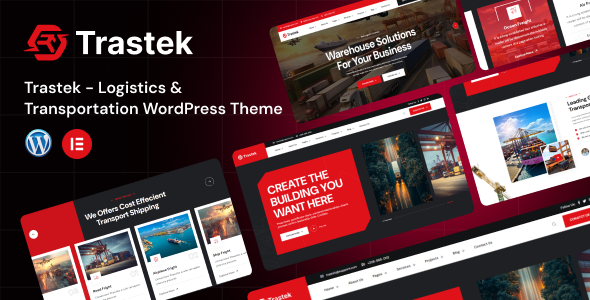
Transko – Logistics WordPress Theme for Transportation, Cargo & Trucking Companies
Transko is a logistics WordPress theme for freight forwarders, cargo and courier services, trucking companies, warehouses and shipping agencies. It is built with Elementor and Bootstrap 5 and comes with 2 home pages, 14+ inner pages and 30+ custom Elementor widgets. See the live preview of Transko.
The layouts explain your services, coverage, fleet, team and prices, and lead visitors to a quote request or contact form. It also fits anyone looking for a trucking theme or a transportation WordPress theme for a transport business.
Quick Facts
- Platform: WordPress theme
- Page builder: Elementor
- Home pages: 2 home page layouts
- Pages: 14+ inner pages
- Widgets: 30+ custom Elementor widgets
- Demo content: one-click demo import
- Updates: free lifetime updates from your WordPress dashboard
- Setup: free theme installation and demo setup by the OrdainIT team
- Markup: W3C validated HTML5 and CSS3
- Retina ready: sharp on high-resolution screens
- Support: 24/7 support from the OrdainIT team
- Seller: OrdainIT, on ThemeForest since 2021
Who Is This Logistics WordPress Theme For?
- Logistics companies and freight forwarders
- Cargo, courier and parcel delivery services
- Trucking and transport businesses
- Warehouses and supply chain providers
- Shipping and moving agencies
Key Features of Transko
- 2 home pages and 14+ inner pages
- 30+ custom Elementor widgets for logistics content
- 2 header styles and 2 footer styles
- Services, portfolio and project post types
- Team, testimonial, pricing and FAQ sections
- Quote request and contact forms with Contact Form 7
- Global colors, typography, logo and menu settings in the Customizer
- Child theme included for safe customization
- Translation ready with a POT file, RTL stylesheet included
- Bootstrap 5, responsive on desktop, tablet and mobile
Pages Included
Transko includes 2 home pages plus about, company history, services, service details, portfolio and project, team, team details, testimonials, pricing, FAQ, quote request, contact, blog, single post and 404 pages.
Plugins Used by Transko
- Elementor
- Transko Core
- Pure Metafields
- Contact Form 7
- One Click Demo Import
- Kirki Customizer Framework
- Breadcrumb NavXT
Tech, Files and Requirements
- WordPress 6.0 or later, PHP 7.4 or later (8.1 or later recommended)
- MySQL 5.6 or MariaDB 10.0 or later
- Download includes the theme zip, a child theme zip, plugins, demo data and documentation
How to Install This Logistics WordPress Theme
- Get the theme with the buy button on this page and download the theme zip file.
- In WordPress go to Appearance, Themes, Add New, Upload Theme, and install the theme. Upload only the theme zip, not the full download package.
- Install and activate the required plugins that the theme suggests.
- Import a demo with One Click Demo Import, then replace the sample text, images, logo and colors.
Step-by-step guides are in the Transko documentation.
Updates, License and Setup
When a new version of Transko is released, your WordPress dashboard shows “New version available” under Appearance, Themes, and you can update with one click after you activate your license in the theme. You keep lifetime access to theme updates. Every OrdainIT WordPress theme comes with free theme installation and demo setup by our team. The license terms are on the OrdainIT license page.
About OrdainIT
OrdainIT has built website templates since 2021, with 1,300+ sales and a 4.48 out of 5 rating from 25 ratings on ThemeForest. Every theme comes with free lifetime updates. See the OrdainIT portfolio on ThemeForest.
Frequently Asked Questions
Do I need coding skills?
No. You edit the pages with Elementor and change colors, fonts and logos in the theme options.
Which plugins does Transko need?
Elementor, Transko Core and Pure Metafields are needed. Contact Form 7, One Click Demo Import, Kirki and Breadcrumb NavXT are recommended. The theme shows a notice with the plugins to install after activation.
Is there a Next.js version for logistics?
nYes. If you want a React site instead of WordPress, see the ToGeto logistics website template.n
How do I update Transko?
Go to Appearance, Themes in your WordPress dashboard. When a new version is available, click Update now. Back up your site first.
Is installation included?
Yes. Free theme installation and demo setup by the OrdainIT team is included with every OrdainIT WordPress theme.
Can I get a refund?
Yes. You can ask for a full refund within 14 days of purchase.
More Templates and Guides
- ToGeto – Logistics Website Template for Freight Brokers & Transport Companies
- Buconz – Multipurpose Business WordPress Theme
- Read our guide: Corporate WordPress Theme: 8 Options Compared
- Browse all WordPress themes from OrdainIT
Update Your Theme from the WordPress Dashboard
When a new version of Transko is released, your WordPress dashboard shows New version available in Appearance, Themes. Click Update now to install it. Every OrdainIT license includes lifetime free updates.
Take a backup before you update. See how updates work.


Reviews
There are no reviews yet.