 New release:

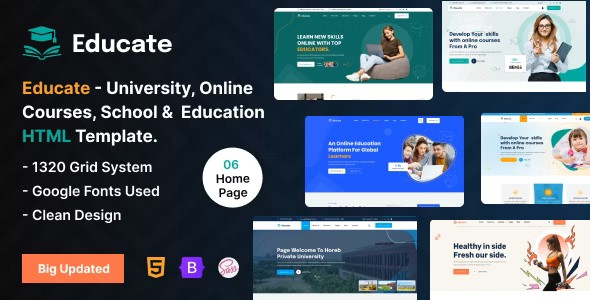
Educate – Best HTML Template For Educational Website
Educate is an educational website HTML template for academies, classes, colleges, courses, e-learning, kindergartens and schools. It has 6 home pages and 33+ pages, built with HTML5, CSS3 and Bootstrap 5.x. See the live preview of Educate.
It includes 4 blog pages and a one-page menu, and the download comes with HTML, CSS and JavaScript files.
Quick Facts
- Format: HTML template (HTML5, CSS3 and Bootstrap)
- Home pages: 6 home pages
- Pages: 33+ pages
- Updates: free lifetime updates
- Seller: OrdainIT, on ThemeForest since 2021
Who Is Educate For?
- Academies and classes
- Colleges and universities
- Courses and e-learning platforms
- Kindergartens and schools
- Student and event websites
Key Features of Educate
- 6 home pages
- 33+ total pages
- 4 blog pages
- One-page menu included
- Based on Bootstrap 5.x
- Responsive layout for desktop, tablet and mobile
- Flat, modern and clean design
- Retina ready
- SASS CSS
- Touch friendly
- Integrated Google Maps
- Fixed menu
- Full UI kit elements
- Clean and commented code
- Valid HTML5 and CSS3
- W3C validated code
- Image background support
- HTML, CSS and JS files included
- Detailed documentation
Libraries, Fonts, Icons and Image Credits
- Bootstrap, jQuery, Magnific Popup and Swiper.js
- Fonts: Prompt Sans
- Icons: Font Awesome Pro
- Preview photos: Freepik and Unsplash (for demonstration only, not included in the download)
Tips for Customizing Educate
An education website works best when a visitor can find a course and sign up in a few clicks. Keep the structure and replace the sample content with your own.
- Start with the course pages, because they are the core of the site.
- Use the blog pages for useful learning tips.
- Keep the sign-up form short.
- Replace the preview photos with your own photos.
How to Use Educate
- Get the template with the buy button on this page.
- Extract the files and open the HTML pages in a code editor.
- Replace the sample text, images, logo and colors with your own content.
- Upload the files to your hosting.
About OrdainIT
OrdainIT has built website templates since 2021, with 1,300+ sales and a 4.48 out of 5 rating from 25 ratings on ThemeForest. Every template comes with free lifetime updates. See the OrdainIT portfolio on ThemeForest.
Frequently Asked Questions
What do I get with Educate?
Educate comes as HTML, CSS and JavaScript files that you can edit in any code editor.
Do I get free updates?
Yes. OrdainIT templates come with free lifetime updates.
Are the preview images included?
No. The photos in the live preview are for demonstration only and are not included in the download. Replace them with your own images.
Is there a WordPress version?
OrdainIT also sells WordPress themes and HTML templates. Browse them if you prefer a CMS or want a different design.
Is there a design file version?
Yes. See Educate – Best Figma Template for Educational Website if you want to design in a tool before you build.
Where can I read the license terms?
The license terms are explained on the OrdainIT license page.
More Templates and Guides
- Edunity – Best Education Website Templates for Schools, Universities & Online Courses
- Siksha – Education & Online Course HTML5 Template
- Design file version: Educate – Best Figma Template for Educational Website
- Browse all HTML templates from OrdainIT
- Browse all free templates from OrdainIT
- Read our guide: Education Website Templates for Schools, Universities & Online Courses
- Read our guide: 10 Best Online Courses Website Templates for eLearning Sites 2026

Reviews
There are no reviews yet.